

Smoke and fire looks
Six ready-made looks for smoke and fire, a click each, and your own looks saved for every file.
A look sets how a simulation's gas behaves, in one click: how it rises, cools, fades, swirls and burns. The looks are in the Smoke and Fire panel, under the preset button (the small list icon) at the right of its header. The panel shows when the simulation's flow has a Smoke Source, so the looks work with the Fire, Smoke, Explosion and Set on Fire starters and any flow of your own with smoke.
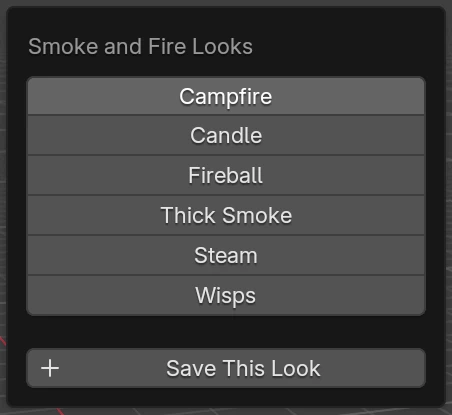
Applying a look changes settings that the bake depends on, so bake again to see it. CtrlZ undoes it.
What a look sets, and what it leaves
A look sets these fourteen settings of the Smoke and Fire panel: Buoyancy, Weight, Cooling, Fade, Swirl, Burn Rate, Ignition, Heat, Smoke, Expansion, Flame Life, and the turbulence's Turbulence, Size and Change.
It leaves everything else as it is:
- Cell Size, which goes with the size of your scene, not the look;
- the wind and drag, the colliders and the ground;
- the solver and its steps;
- the Render Look (smoke colour, density, flame brightness);
- the flow: how much smoke and fuel the particles give off.
The built-in looks
- Campfire: a steady fire with licking flames and a fair plume of smoke. It's the Fire starter's own look.
- Candle: a small, calm flame. It cools fast, gives little smoke, and hardly stirs.
- Fireball: hot, fast-burning gas that swells hard and climbs fast, churning as it goes. For blasts.
- Thick Smoke: heavy, sooty smoke that rises slowly, never thins, and rolls in big, slow swirls.
- Steam: rises quickly and fades away fast, with little smoke left behind.
- Wisps: thin smoke that keeps rising and curls strongly in fine, quick-changing swirls.
| Setting | Campfire | Candle | Fireball | Thick Smoke | Steam | Wisps |
|---|---|---|---|---|---|---|
| Buoyancy | 1.0 | 0.8 | 1.5 | 0.6 | 1.2 | 0.8 |
| Weight | 0 | 0 | 0 | 0.3 | 0 | 0 |
| Cooling | 0.8 | 1.5 | 0.6 | 0.3 | 0.4 | 0.2 |
| Fade | 0.15 | 0.5 | 0.1 | 0 | 0.8 | 0.2 |
| Swirl | 0.4 | 0.1 | 0.5 | 0.4 | 0.3 | 0.8 |
| Burn Rate | 3 | 4 | 4 | 2 | 2 | 2 |
| Ignition | 0.5 | 0.5 | 0.3 | 0.5 | 0.5 | 0.5 |
| Heat | 2 | 1.5 | 3 | 1 | 2 | 2 |
| Smoke | 1.0 | 0.2 | 1.0 | 2.0 | 0.3 | 1.0 |
| Expansion | 0.4 | 0.2 | 3.0 | 0.5 | 1.0 | 1.0 |
| Flame Life | 10 | 15 | 6 | 10 | 10 | 10 |
| Turbulence | 1.5 | 0.2 | 2.0 | 1.0 | 0.8 | 0.5 |
| Turbulence Size | 0.3 | 0.1 | 0.4 | 0.5 | 0.2 | 0.15 |
| Turbulence Change | 0.5 | 0.5 | 0.8 | 0.4 | 0.6 | 1.0 |
The burning settings (Burn Rate to Flame Life) only matter when the particles give off fuel. For plain smoke, they change nothing.
Save your own
Set the panel up as you like it, then open the preset button and press Save This Look. Give it a name and press Save. It's listed under Saved in the same menu, in every .blend file on this computer.
- A look can't take a built-in look's name ("Give the look a name of its own"). Saving under a name you've already used replaces that look.
- Saved looks are kept in VecFlow's folder in Blender's user files, in
smoke_looks.json. Copy that file to another computer's VecFlow folder to take your looks with you.
Remove one
Open the preset button and press − beside the saved look. The built-in looks can't be removed.
Related
- Smoke and Fire, setting by setting
- The Fire starter