

VecFlow0.1.0
Effects guides

Using values

Recipes for values each particle carries: count bounces and change on the third, give each particle its own weight, colour particles in a shader by a value, and check a value at a frame.

VecFlow 0.1.0

A value is something each particle carries that you name: a count, a strength, a flag. Values explains each part; these are recipes that use them.

Change on the third bounce

Count each particle's bounces, and send it on when there are three.

In the flow editor's Values panel, add bounces, a Whole Number starting at 0.

Build the flow below. The Collide in Bouncing sends each hit to Hit, which adds 1 and sends it straight back, until there are three.

A flow of 3 events. Bouncing: Birth, Position, Gravity, Collide; Collide: ground, bounce 0.6 sends to Hit. Hit: Set Value, Value Test, Age Test, Gravity, Collide; Value Test: bounces above 2.5 sends to Done; Age Test: at 0 s since entering sends to Bouncing. Done: Colour, Gravity, Collide.BouncingCollide: ground, bounce 0.6Birth: 50 per frame from 1. Make new particles: some every frame, all at once, one on each vertex of an object's mesh (for cloth and ropes: bind them with Bind, Mesh Edges), one on each piece of it (to smash: glue them with Bind, Pieces), or the event's Liquid filling itBirth: 50 per frame from 1Position: Spout, box. Place new particles in an object's box, on its surface or inside it, or along a curve (a tube round it)Position: Spout, boxGravity: 9.81 m/s². Pull particles down, or any way you point itGravity: 9.81 m/s²Collide: ground, bounce 0.6. Bounce off an object, a collection's objects or the ground, friction slowing their sliding and their spin where they touch. The ones that hit go along the wireCollide: ground, bounce 0.6InHitValue Test: bounces above 2.5Age Test: at 0 s since enteringCollide: groundSet Value: bounces: add 1. Set one of the flow's values (listed under Values in the sidebar), or the particle's own position, velocity, speed, scale, colour, spin or shape, as particles enter the event (or every step, for all in it): to a number, a random one, a chance, something of the particle's, another value, the distance to an object, the time or the flow's gas where it is. Shaders read exported values as attributesSet Value: bounces: add 1Value Test: bounces above 2.5. Particles whose value is above or below a number (a part of a vector's), or set to yes or no, go along the wireValue Test: bounces above 2.5Age Test: at 0 s since entering. Particles reaching an age go along the wireAge Test: at 0 s since enteringGravity: 9.81 m/s². Pull particles down, or any way you point itGravity: 9.81 m/s²Collide: ground. Bounce off an object, a collection's objects or the ground, friction slowing their sliding and their spin where they touch. The ones that hit go along the wireCollide: groundInDoneCollide: groundColour: red. Set the colour of particles entering the eventColour: redGravity: 9.81 m/s². Pull particles down, or any way you point itGravity: 9.81 m/s²Collide: ground. Bounce off an object, a collection's objects or the ground, friction slowing their sliding and their spin where they touch. The ones that hit go along the wireCollide: groundIn
Balls that turn red on their third bounce.BirthForcesPhysicsLooksTests

The test is above 2.5: Above means more than, so 3 passes and 2 doesn't. Swap the red Colour for anything: a Delete, a Spawn of sparks, a Speed up.

Each particle its own weight

Some float like feathers, some drop like stones: a random number each, weighing Gravity.

Add weight, a Number starting at 1.

In the event, a Set Value: Value weight, From Random, between 0.2 and 1. It's set as each is born.

In Gravity's Influence, name weight. Each particle is pulled by its own share: 0.2 a fifth as hard.

Any force or look weighs the same way: Turbulence by a value for some that flutter more, Scale by one so size follows something else.

Colour by a value in a shader

Leave Export on for the value, and it's saved with each frame as an attribute of its name.

In the particles' material, add an Attribute node with the value's name (type Instancer for shapes, Geometry for spheres).

Into a Map Range (from its lowest to highest), then a Color Ramp, into Base Color.

With bounces, the balls darken as they bounce; with a value set from Distance to an object, they glow as they near it. In Geometry Nodes, read it with Named Attribute.

Check what a value does

The sidebar's Values at This Frame panel, folded away at first, shows each exported value's Lowest, Mean and Highest across the particles at the frame you're on. Step through frames and watch: that bounces climbs, that a remap lands between 0 and 1, that weight spreads between 0.2 and 1.
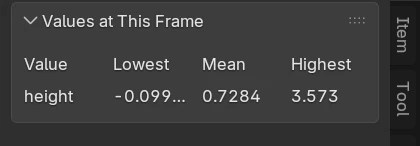
The Values at This Frame panel: one row, height, with its Lowest, Mean and Highest across the particles
A value called height, set from each particle's height every step, at frame 60 of the Fountain.

What goes wrong

  • Nobody is sent on. The value never reaches the test: Set Value is in another event, or Starts At is already past it.
  • An Influence does nothing. The value is 0 for every particle: nothing sets it, and it starts at 0.
  • The shader shows black. The Attribute node's name or type: names are exact, Instancer for shapes.
  • The value isn't in Values at This Frame. Its Export is off, or the bake is older than the value: bake again.

On this page