

Destruction
Cut a mesh into pieces with the Fracture tool, glue them into one body, and smash it: on the ground, with a ball, or one piece at a time.
Destruction is three things: a mesh cut into pieces, the pieces glued into one rigid body, and something that hits it hard enough to break the glue.
Start from
The Shatter starter does all three for the selected mesh: cuts it into 40 pieces, glues them, and drops them on the ground, where they break apart.
1. Cut it into pieces
Select a closed mesh and run ObjectQuick EffectsFracture (VecFlow). It makes a new object, “mesh Pieces”, holding the pieces as its loose parts, lying flush as they were, and hides the original. The cut faces get a material of their own, VecFlow Inside: give it the look of the broken inside (raw concrete, splintered wood).
Its settings are in the panel at the bottom left of the viewport, right after:
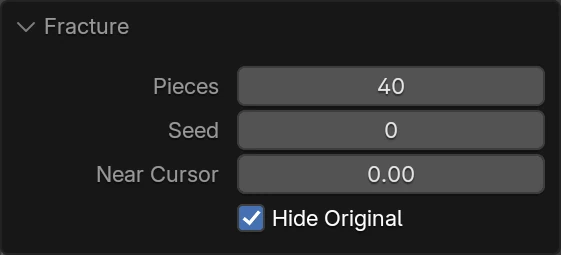
- Pieces: how many to cut it into, 40 at first. A hollow or bent shape may give more.
- Seed: another number cuts it another way.
- Near Cursor: the share of the cuts gathered round the 3D cursor. Put the cursor where it will be struck, and the pieces come smaller there and bigger further off, as real breaks do.
- Hide Original: hides the mesh that was cut, in the viewport and in renders.
The mesh must be closed: an open one (a plane, a shell) has nothing inside to cut. Give it thickness with a Solidify modifier and apply it first.
Once baked, the bake shows the pieces: hide the Pieces object in renders, as the Shatter starter does.
2. Make the pieces bodies, and glue them
In a flow:
- Birth On Pieces, the Pieces object as its Object: a particle for each piece, where it lies.
- Rigid Body, Shape Hull, and a Density for the material: concrete or stone 2,400, brick 1,900, wood 600, glass 2,500.
- Bind, Make Pieces (each piece to those it touches), Joint Glue: they're one body until it breaks.
- Gravity and a Collide with the ground.
3. Break it
Glue breaks two ways:
- Break Impulse: around a piece struck harder than this, in newton seconds. A 1 kg ball hitting at 10 m/s strikes with about 10. The Shatter starter uses 20. Lower shatters on any knock; higher only cracks where it's hit hardest. This is what breaks a wall where a ball hits it.
- Break Load and Break Torque: glue holding with more than this many newtons, or twisted harder than this many newton metres, gives way. For things that break under their own weight: a beam too long, a bridge with a piece knocked out. Endure lets it hold a while overloaded before it goes.
Variation spreads each glue joint's limits, so it breaks unevenly.
A ball through a wall
Model the wall standing on the ground, and put the 3D cursor where the ball will hit. Fracture it with Near Cursor at 0.5, for small pieces there.
Build the two events. The ball is born inside a small Cannon object. Its Speed names the Cannon as its Object, so it goes along the Cannon's Z axis: point that at the wall.
With no shape of its own, the ball is a sphere of the Display panel's Sphere Radius times its scale: the Scale of 12 turns the default radius of 1.2 cm into about 14 cm.
Bake. If the whole wall falls, raise Break Impulse; if the ball bounces off, lower it, or make the ball heavier or faster.
The ball can be a kinematic body instead, moved by an object you keyframe: a wrecking ball on a Pin with its object.
Ideas
- Crumbling one piece at a time: a Chance Test sends pieces to an event with its own Rigid Body and no Bind, so they drop out at random.
- Held until hit: kinematic pieces and a Struck Test, for things that shouldn't settle at all before they're hit.
- Dust where it breaks: particles losing a bind go along the Bind's wire: send them to an event with a Spawn of small dust particles, or a Smoke Source.
What goes wrong
- “Has nothing inside to cut”. The mesh isn't closed. Close it, or Solidify and apply.
- “Cut into … pieces, but it isn't closed”. The pieces may be hollow: Solidify first and cut again.
- The wall falls apart by itself. Glue too weak for its own weight with Break Load set; or the wall starts above the ground and breaks landing: put it on the ground.
- Nothing breaks. Break Impulse too high for the hit. Remember the ball's weight counts: a light ball barely strikes.
- Pieces jitter or sink into each other. Raise the Rigid Body's Rounds, or the bake's Substeps.
- Breaks come out too even. Raise Near Cursor, and add Variation.
Related
Rigid bodies
Bricks, crates, rocks and dice that tumble, stack and come to rest; bodies moved by hand; and joints for chains, doors, wheels and drawers.
Liquids
Water that fills, pours, splashes and carries things off: filling and inflows, choosing a spacing, tanks, thick and sticky liquids, floating bodies, and the surface mesh.