

Values: data each particle carries
Values are numbers, vectors or yes-or-no flags each particle carries: set them with Set Value, test them with Value Test, weigh operators by them, and read them in shaders.
A value is something each particle of a flow carries: a number, a vector, a whole number or a yes or no. You choose what it means. Tag particles that hit something, count how often they bounced, give each its own strength, then use it:
- test it to send particles on (Value Test);
- weigh an operator by it, particle by particle (Influence);
- colour or shape them by it in a shader, as an attribute.
Adding a value
In the flow editor's sidebar, open the Values panel and press +.
| Setting | What it is |
|---|---|
| Name | A letter, then letters, digits or _. It's the attribute's name in shaders too |
| Type | Number; Vector, three numbers (a direction, a place, a colour); Whole Number, a count or a choice; Yes or No, a flag |
| Starts At | What every particle has until it's set (Starts Yes for a Yes or No) |
| Export | Saves it with each baked frame, for shaders and Geometry Nodes to read. On at first |
A name can't be one the particles already have, or one the cache uses:
x, y, z, id, age, scale, position, velocity, speed,
color, spin, shape, rotation, radius, time, normal, uv and a
few more. The editor says when it is. Renaming a value renames it in every
operator that uses it.
Every particle in the flow has every value, whichever event it's in. A particle keeps its values as it moves from event to event, and one made by Spawn starts with its parent's.
Setting a value: Set Value
Set Value sets a value as particles enter its event, or every step with Keep Doing It.
Value is what it sets: one of the flow's values, or one of the particle's own: position, velocity, speed, scale, color, spin or shape. So Set Value can also set a particle's speed from its age, or its colour from where it is.
From is where the number comes from:
| From | Gives |
|---|---|
| Number | The same for every particle (a vector, a whole number or a yes or no, if that's what it sets) |
| Random | A number between two, different for each particle, and the same each time it's set for one particle |
| Chance | Yes for that share of the particles, at random |
| Particle | Something of the particle's own: Age, Time in Event, Speed, Position, Velocity, Scale, Colour, Spin, Id or Shape |
| Value | Another of its values |
| Distance | How far it is from an object's origin, or from the nearest point of its surface, in metres |
| Time | Seconds into the bake |
| Gas | The flow's smoke and fire where it is: Heat, Flame, Smoke, Fuel, Speed, Velocity or Colour |
Then, in order:
- Part takes one part of a vector it reads: X, Y, Z or its length. A vector going into a number needs one.
- Remap turns one range of numbers into another, in a straight line through and beyond: speeds from 0 to 10 into 0 to 1, say.
- Clamp keeps the number between Low and High.
- Mode says how it goes with what's there: Set replaces it, Add, Multiply, Lowest keeps the lower of the two, Highest the higher. A yes or no can only be set.
Numbers turn into the kind being set: to the nearest whole number; to yes when above a half; to a vector of three alike. A yes reads as 1 and a no as 0.
Testing a value: Value Test
Value Test sends particles along its wire by a value: Above a number, Below one, or Between two. A vector is tested by one of its parts (X, Y, Z or its length). A Yes or No is tested by Is Yes: on sends those set to yes, off those set to no.
Influence
Most forces, looks and tests have an Influence field, last in their settings. Name a number value there (a Number, Whole Number or Yes or No) to weigh the operator by it, particle by particle:
- Forces and looks do as much as the value says: 0 nothing, 1 all of it, 0.5 half, 2 twice. Gravity weighed by a value of 0.5 pulls that particle half as hard. A Rotation turns part way. These are Speed, Gravity, Drag, Turbulence, Attract, Swirl, Surface Force, Scale, Rotation, Spin and Colour.
- The rest work only on particles whose value is above a half, and leave the others alone. A Yes or No works as a switch. These are Position, Spawn, Shape, Delete, Set Value and the tests (but Collide and Struck Test).
Physics operators (Particle Physics, Bind, Rigid Body, Liquid, Flock and the rest), Birth, Follow Curve, Goal and Pin can't be weighed; the field isn't there. Each operator's page says which way it takes a value.
A particle has the value's Starts At until something sets it. With Starts At 0, an operator weighed by it does nothing until a Set Value gives the particle more.
In shaders and Geometry Nodes
An exported value is saved with each baked frame as a point attribute of
its name, so a shader reads it with an Attribute node (type Instancer
for particles shown as shapes) and Geometry Nodes with Named Attribute.
A vector is saved as three numbers, name_x, name_y and name_z, and put
back together as name as it plays.
Turn Export off for values only the flow needs: the cache is smaller.
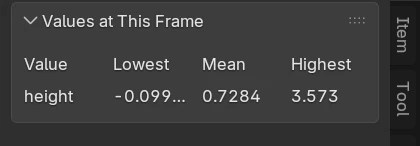
Values at This Frame
With a bake that has exported values, the sidebar's Values at This Frame panel (folded away at first) shows each one's Lowest, Mean and Highest across the particles at the frame you're on. Use it to check a value does what you meant: that “bounces” goes up, or that a remap lands between 0 and 1.
Related
- Using values, a guide with examples
- Set Value and Value Test