

Several simulations at once
Bake every simulation in the scene with Bake All, watch them in the Simulations in the Scene panel, and spread them over GPUs.
A scene can hold any number of simulations, each its own particles object with its own bake. The Simulations in the Scene panel, at the bottom of the VecFlow tab, lists them all.
The Simulations in the Scene panel
Each simulation is a row: its name with its status icon (red when it's changed since the bake), and its Bake button, or its progress bar while it bakes. Click a name to select that simulation.
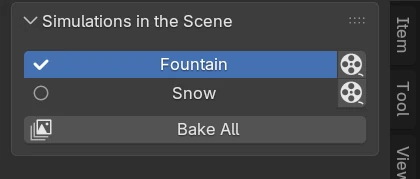
Bake All
With more than one simulation, the panel has Bake All (it's also in the Bake menu). It bakes every simulation in the scene, each in a background Blender:
- On the CPU, one at a time.
- With NVIDIA GPUs, as many at once as there are GPUs, one on each, and one on the CPU for those set to bake there.
- The rest wait their turn. A waiting simulation's row says Waiting its turn to bake, with a stop button to take it off the list.
Stop All (the button beside Bake All while bakes run) stops every background bake and empties the waiting list. Frames finished are kept.
Which GPU each one takes
A simulation with no GPU picked goes to the GPU with the fewest bakes running. One with a GPU picked waits for that GPU. A big liquid or smoke whose Cards setting spreads it over several GPUs waits until all of them are free, and takes them all.
They don't meet
Each simulation bakes on its own: one doesn't see another's particles, gas or liquid. For things that should meet (sparks that fall into water, say), make them events of one flow, in one simulation.